BSN Product Designer

Boppani Shanthan Nihal

Hyderabad, India  /  Open to senior product design roles & contract work

Product Designer — Problem Solver, UX Researcher, Systems Thinker, Interaction Designer and Enterprise Specialist

Over seven years designing enterprise, healthcare, and consumer products — mostly the complicated kind. I run the research, shape the interaction model, and build the design system that holds it together after I hand it over.

+30%product usability over one year Albanero (Infor)
15→5minutes of onboarding, through clearer interaction flows Doctily Digital Health
+25%customer satisfaction in three months ICICI Bank — Tax Payment Portal
+50%delivery speed from design-system foundations Albanero (Infor)
UX Research•Design Systems•Enterprise Workflows•Usability Testing•Interaction Design•Prototyping•Data Visualisation• UX Research•Design Systems•Enterprise Workflows•Usability Testing•Interaction Design•Prototyping•Data Visualisation•

Where I’ve worked deepest

Open case studies →

Selected work

Three case studies
← All work
01

Albanero Datamesh

Acquired by INFOR

Role

User Experience Designer

Years

2022 – 2024

Domain

Enterprise data / ETL

Outcome

99% data accuracy

An ETL tool built specifically for the Infor M3 product. I designed Datamesh, a large-scale data management and transformation platform with complex, data-heavy workflows for enterprise users — work that contributed to product maturity during the period culminating in the company’s acquisition by Infor.

Problem

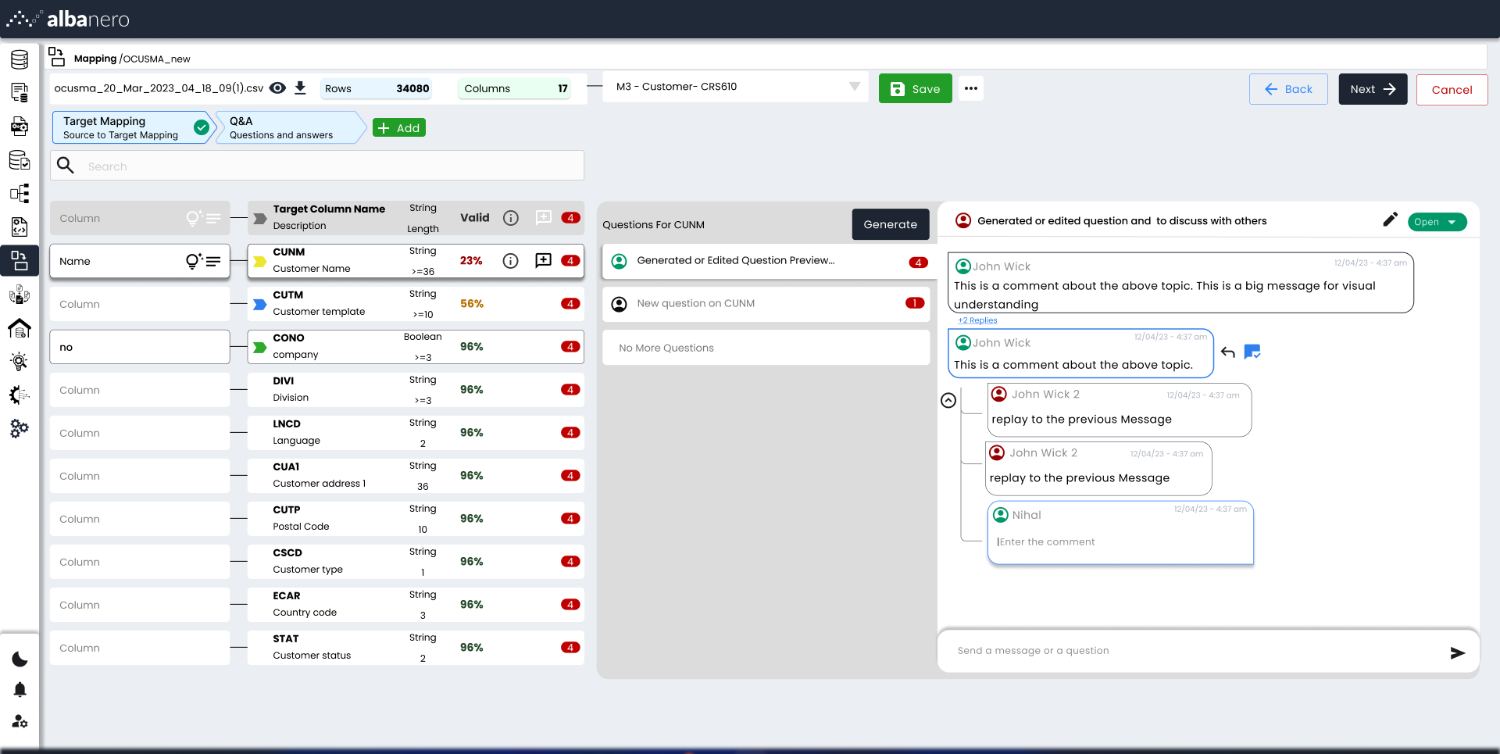
Moving a 34,000-row source file into an M3 target means deciding, per column, what it maps to, how it is cleaned, and which reference table resolves it. Doing that across seventeen columns in separate tools loses the thread.

My role

Sole designer on the mapping experience: information architecture, the operation model, interaction patterns and the shipped UI, working directly with engineering.

Outcome

One four-step flow — target mapping, Q&A, data mapping, reference mapping — running at 99% data accuracy, and a product mature enough to carry through the Infor acquisition.

Stage 01  /  Problem

Seventeen columns, three tools, and nothing holding the thread

An Infor M3 migration starts with a source file — in one representative project, 34,000 rows across seventeen columns. Every single column needs three separate decisions: what it maps to in the M3 target, how its values are cleaned, and which reference table resolves its codes.

Those three decisions were being made in three different places. By the time an analyst reached reference mapping they had lost sight of what they decided at the schema step, and there was no single view that could answer the only question that mattered: is this column finished and correct?

For the business, mapping accuracy was the product. A mis-mapped column does not fail loudly; it surfaces months later as broken reporting, and every failed migration is consulting time the company absorbs. Datamesh had to make mapping auditable enough to stand against incumbent ETL tooling in enterprise evaluations.

Stage 02  /  Research

Watching a migration actually get done

Stakeholder interviewsUser interviewsHeuristic auditSupport tickets & analytics

I interviewed the implementation consultants who run migrations for customers and the data analysts and owners who do the column-level work, and sat with them through live mapping sessions. Separately I ran a heuristic audit of the existing tooling and the competitor products customers compared us against, and went through support tickets and product analytics from migrations already in flight.

The tickets were the most useful source. They were not feature requests — they were people asking each other what a column meant. That reframed the brief from “make mapping faster” to “make the unresolved questions visible and answerable inside the tool”.

Stage 03  /  Insights

What the research changed

I1

The unit of work is the column, not the file

Everyone described progress column by column, but the interface was organised around files and steps. Making the column the primary object let progress, status and history sit in one row.

I2

Ambiguity is a conversation, not an error state

Analysts routinely stalled waiting for a data owner to confirm what a field meant, and that exchange happened over email. It had to move into the product, attached to the column it was about.

I3

Trust comes from seeing before and after

Nobody trusted a transformation they could not check. Every rule had to show the original value and the resulting value side by side while it was being written, not after the job ran.

Stage 04  /  Flow

Four steps, one auditable spine

The mapping experience was restructured into four explicit steps, with a per-column overview acting as the audit layer across all of them. The steps are sequential but not locked — an analyst can jump back to schema without losing transformation work, because the column, not the step, holds the state.

Step 1

Target mapping

Match source columns to the M3 target, with a validity score per column.

→

Step 2

Q&A

Open a thread on any ambiguous column; data owners resolve it in place.

→

Step 3

Data mapping

Chain cleaning and transformation operations, with a live old/new preview.

→

Step 4

Reference mapping

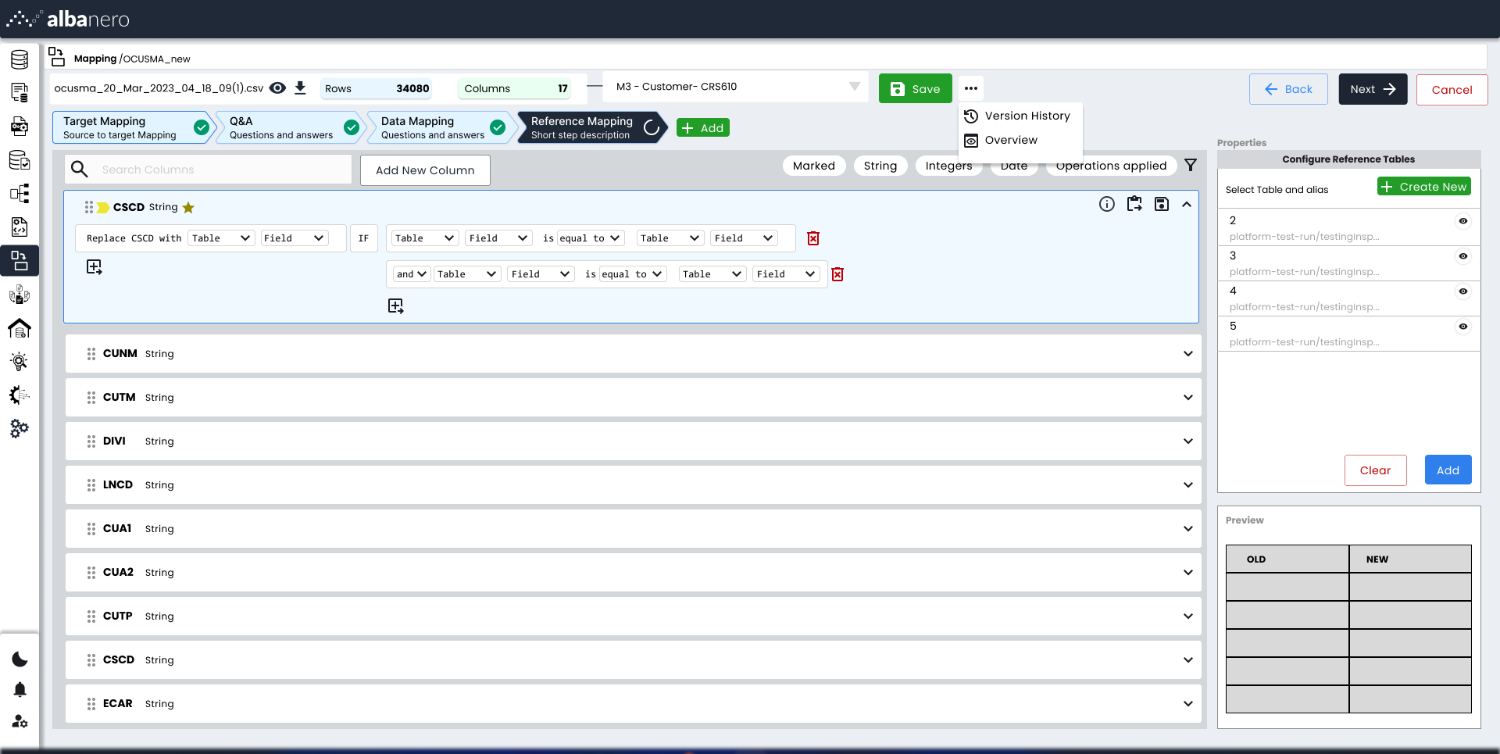
Resolve codes against reference tables using readable conditions.

Stage 05  /  Decisions

Three layouts for the same model

The hard question was not what the operations were, but how to show a chain of them for seventeen columns at once. I wireframed three structures and tested each against the same 34,000-row file.

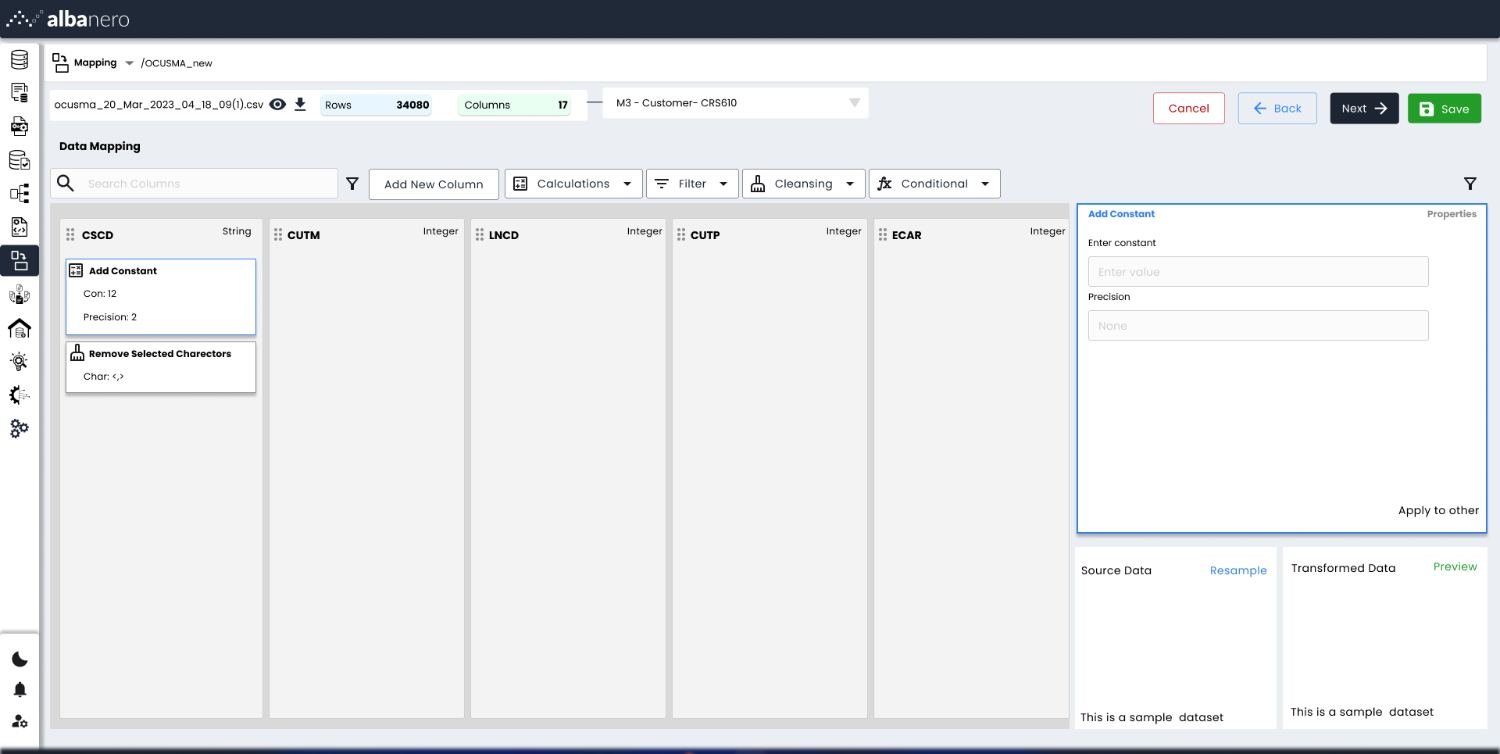
A — Column list on the left, transformation as a horizontal pipeline on the canvas. Reads well for one column; the chain runs off-screen once rules stack up.
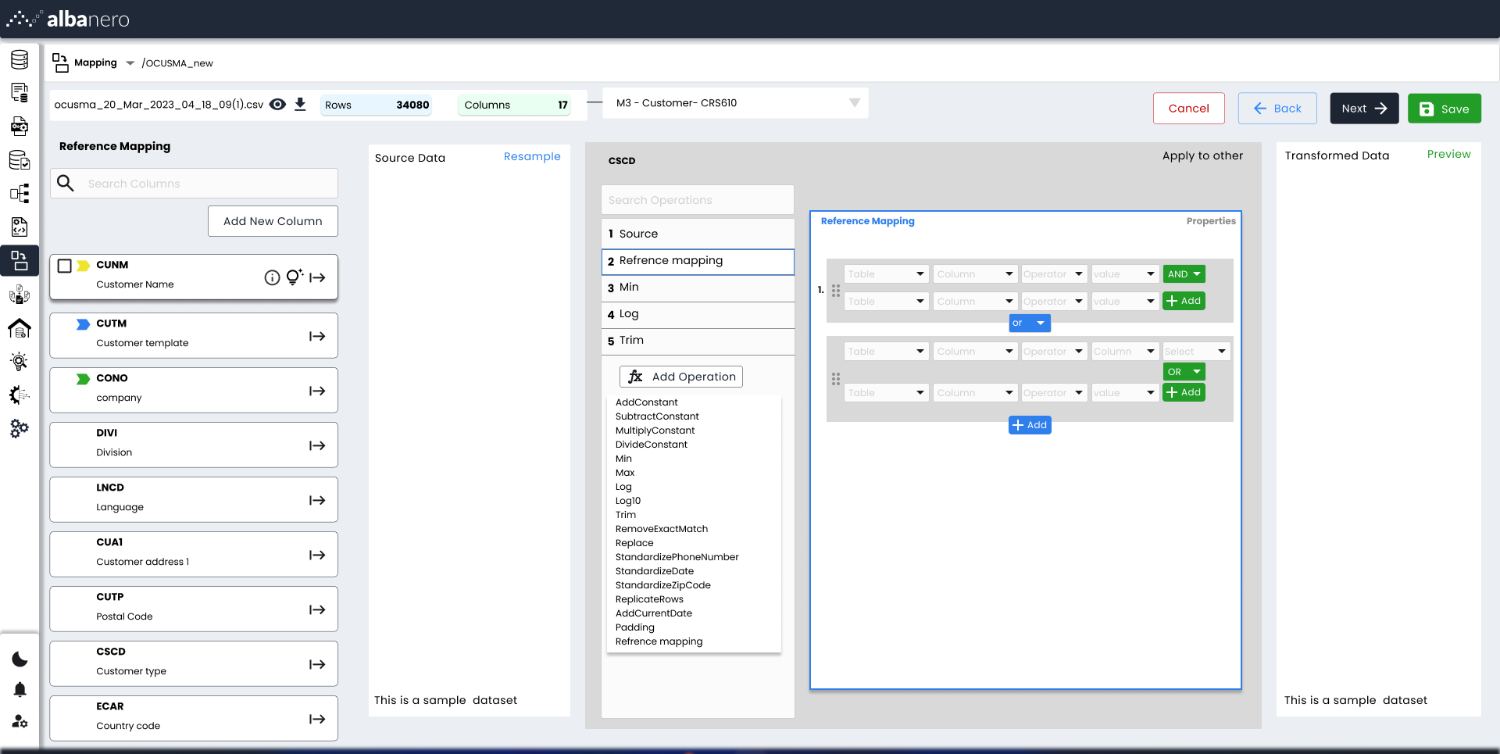
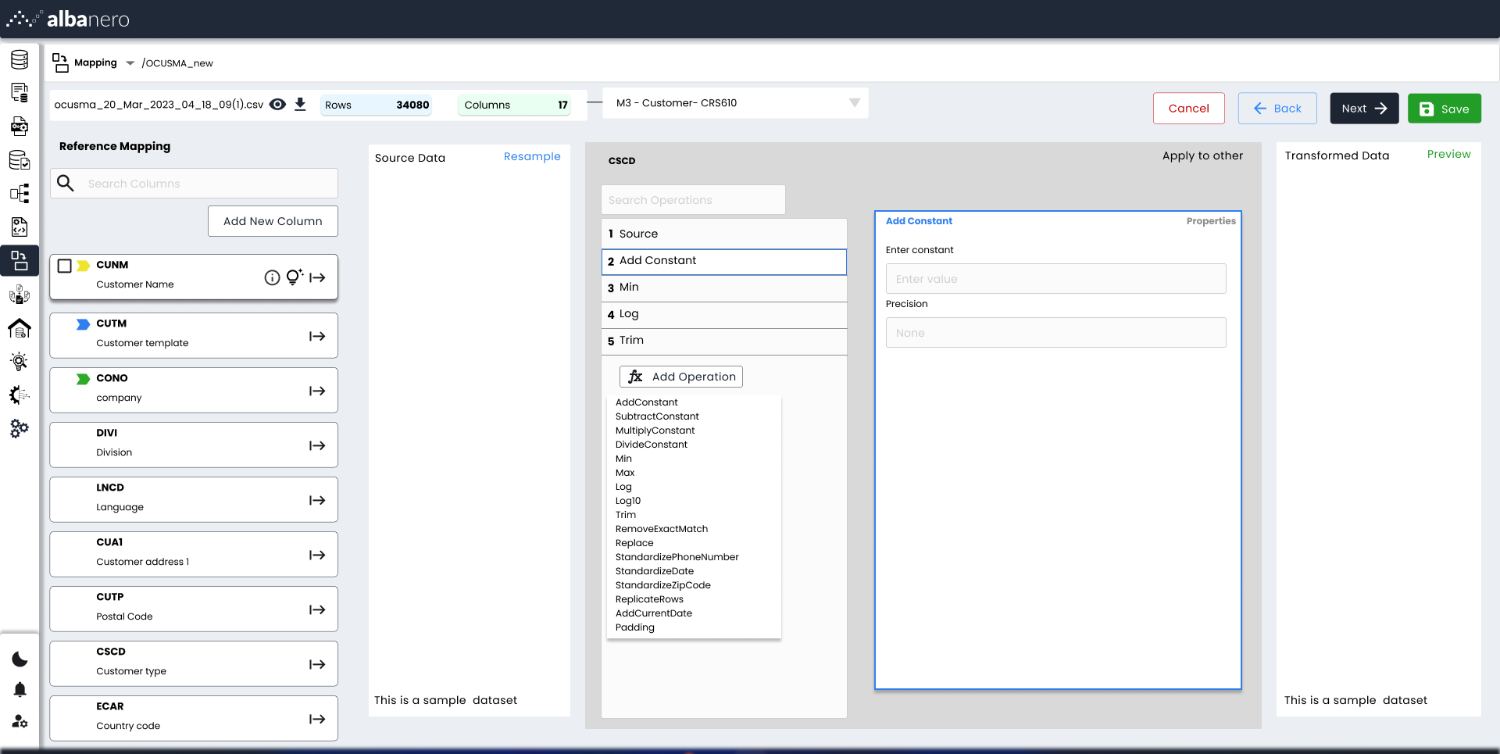
B — Operations as a vertical numbered stack, source data on one side and transformed data on the other, so the effect of a rule is visible while editing it.
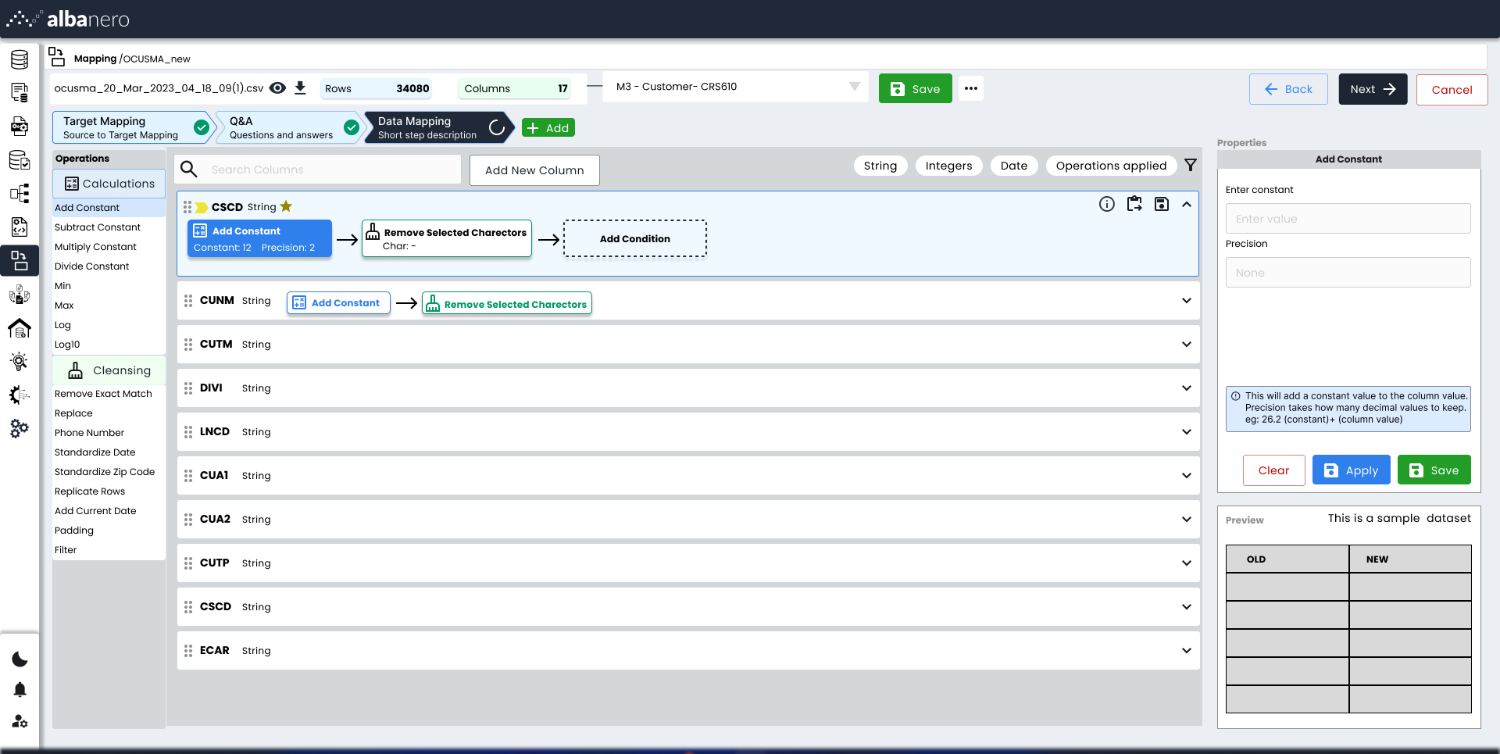
C — shipped: every column is one collapsed row that expands into its own chain. Seventeen columns fit on one screen and the flow scales to any table width.

Explorations — the transformation editor

With the row model settled, the remaining work was the editor inside it: how a chain reads, where properties live, and how the preview stays visible while a rule is being written.
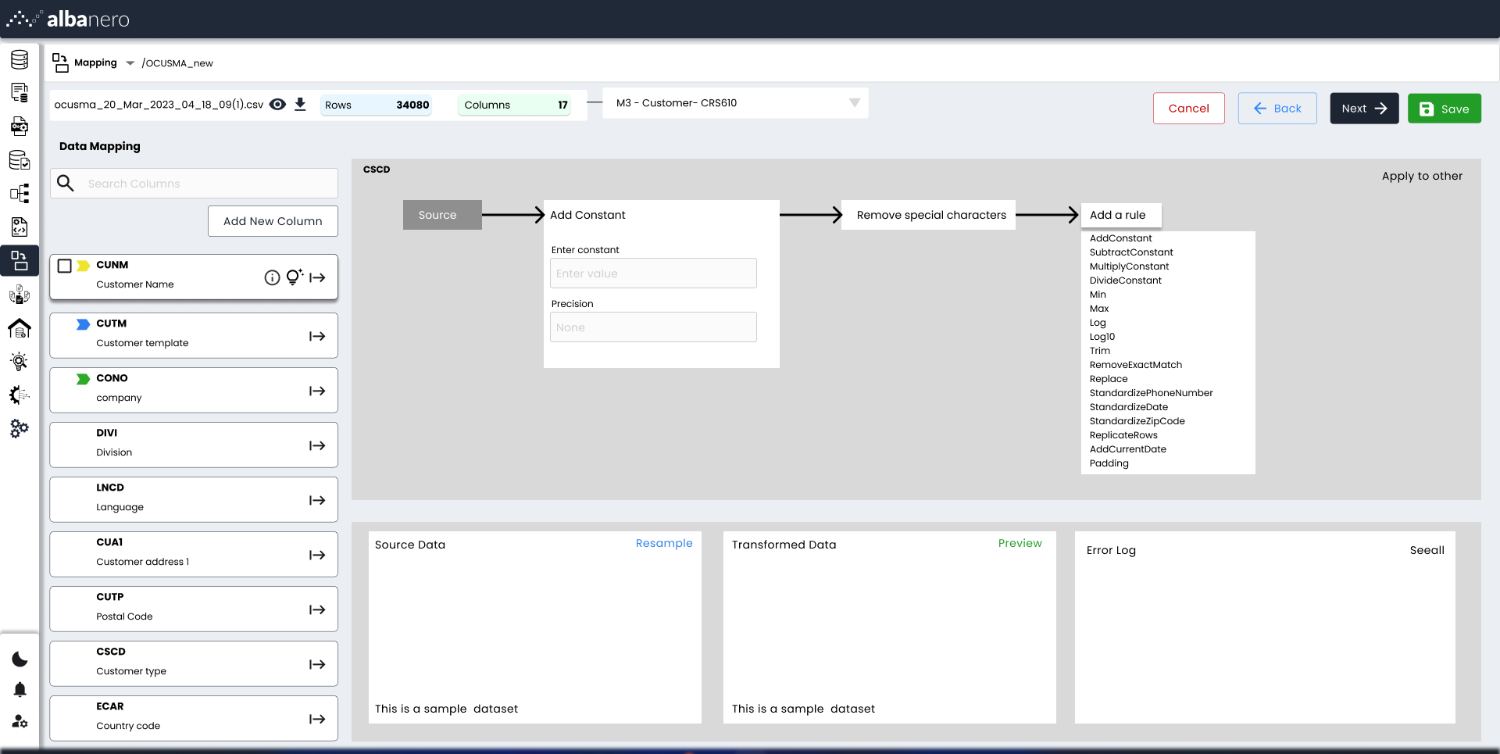
Column transformation pipeline with chained operations
01 — Transformation as a left-to-right pipeline: source, operation, rule, with properties inline.
Stacked operation list with properties panel
02 — Same model as a numbered stack, with source and transformed data flanking the editor.
Column board with operation cards
03 — A board per column: operations become draggable cards so mappings can be compared side by side.
Reference mapping condition builder
04 — Reference mapping: nested AND/OR condition groups built without leaving the operation stack.

Stage 06  /  Final UI

The shipped mapping flow
Before

Transformation logic lived in a separate tool from the schema mapping, so the reason a value looked wrong was two contexts away.

After

Every column is one row that expands into its own operation chain, with the resulting value previewed beside the rule that produced it.

Before

Questions about what a field meant were resolved over email, outside any record of the migration.

After

A Q&A thread hangs off the column itself, so the answer stays with the decision it justified.

Target mapping with validity scores and a threaded Q and A panel
Target mapping carries a validity score per column, and an open Q&A thread beside it so data owners resolve ambiguity in place rather than over email.
Data mapping step with operation chain per column
Data mapping: every column collapses to one row, expanding into its own operation chain with properties and an old/new preview on the right.
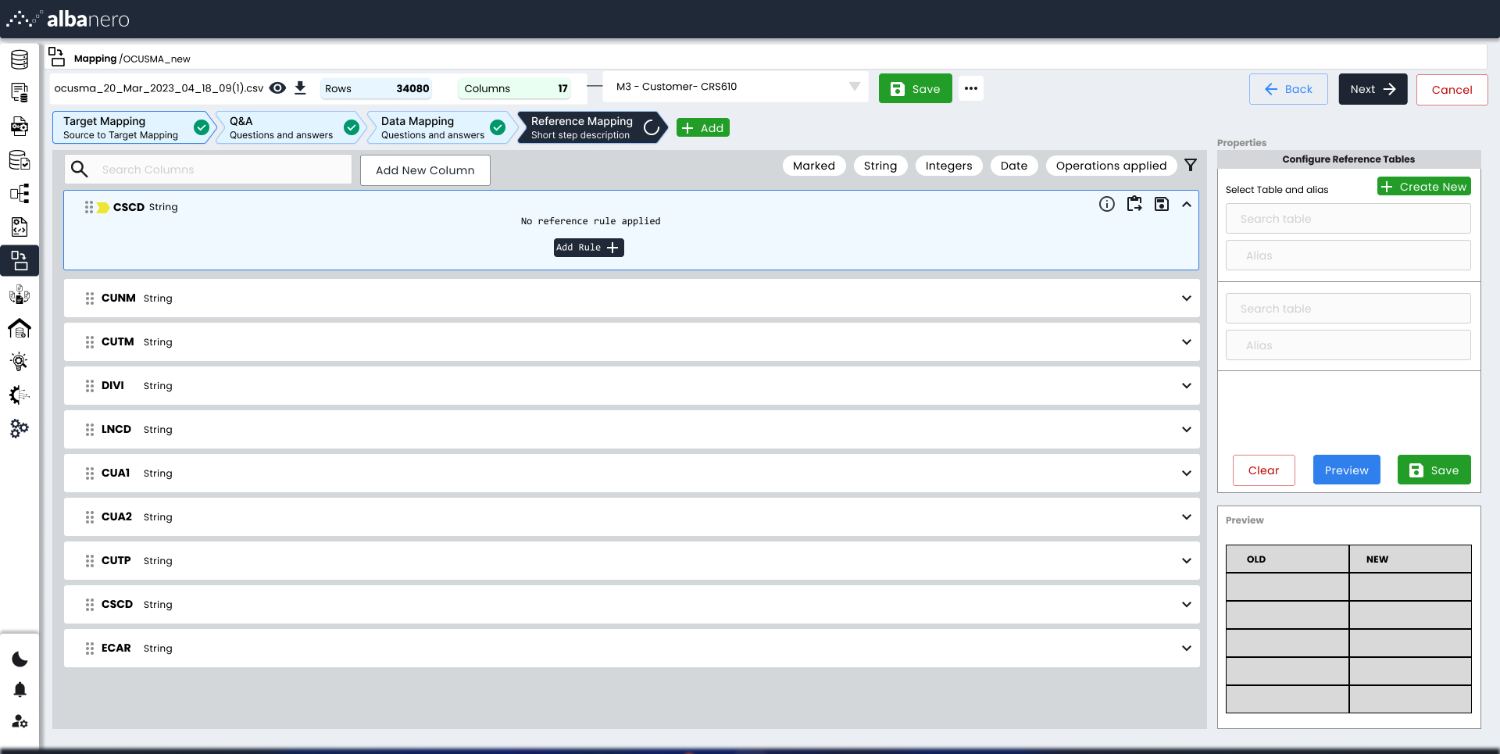
Reference mapping step before any rule is applied
The same row pattern carries into reference mapping, with the empty state stating plainly that no rule is applied yet.
Reference rule builder with chained conditions
Rules read as a sentence — replace this with that, if these conditions hold — so analysts write logic without writing SQL.
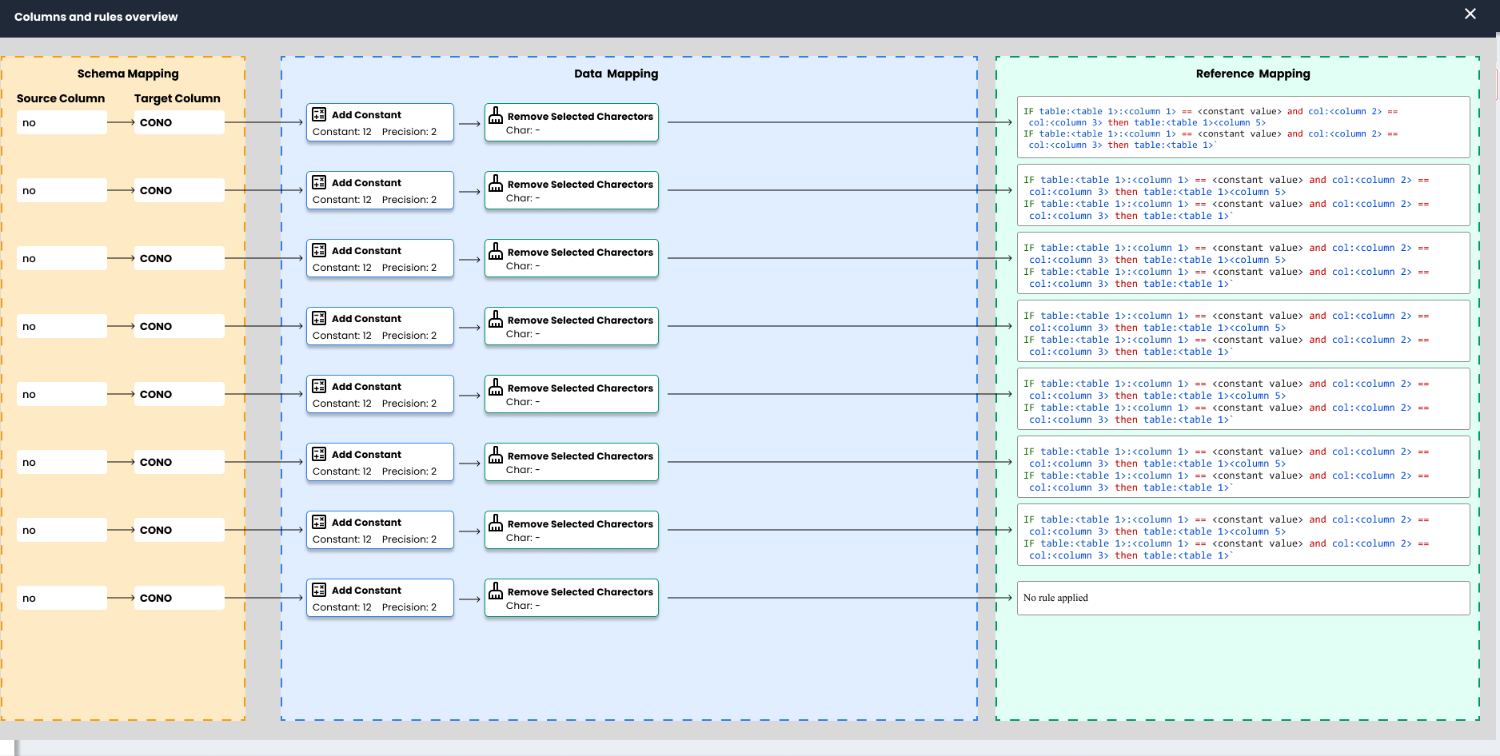
Columns and rules overview linking schema, data and reference mapping
One overview ties the three stages together per column — schema, transformation, reference rule — which is where the accuracy target gets audited.

Stage 07  /  Validation

Tested on real migration files

We ran moderated usability sessions with data analysts and implementation consultants, using their own migration files rather than sample data. Tasks were the real ones: finish mapping a column end to end, find out why a value came out wrong, and hand an unresolved column to someone else.

The sessions were where the row model earned its place — and where three things broke.

C1

Rows now collapse by default

Participants opened every column out of caution and immediately lost the overview. Collapsed became the default state, with status readable without expanding.

C2

The validity score was made explicit

People could not tell a confident auto-match from a guess. Surfacing the score per column at the target-mapping step turned it into a triage tool.

C3

Empty states say what is missing

“No rules” was read as an error. Reference mapping now states plainly that no rule is applied yet, which is a valid state for many columns.

Stage 08  /  Reflection

What I would do differently

Bulk operations came late. Analysts frequently apply the same cleaning rule to several columns at once, and the column-as-row model makes that natural — we should have designed the multi-select case alongside the single case rather than after it.

Reference mapping still assumes you know your reference tables. It reads well if you do, and is opaque if you do not, which is a research gap: I spoke mostly to experienced analysts and under-sampled the consultants picking up an unfamiliar customer domain.
← All work
02

ICICI Bank — Tax Payment Portal

Full case study

Role

UX research → UI design

Users

Finance managers, mid-sized companies

Scope

Dashboard, bulk payments, approvals

Approach

Research • Ideation • Solution

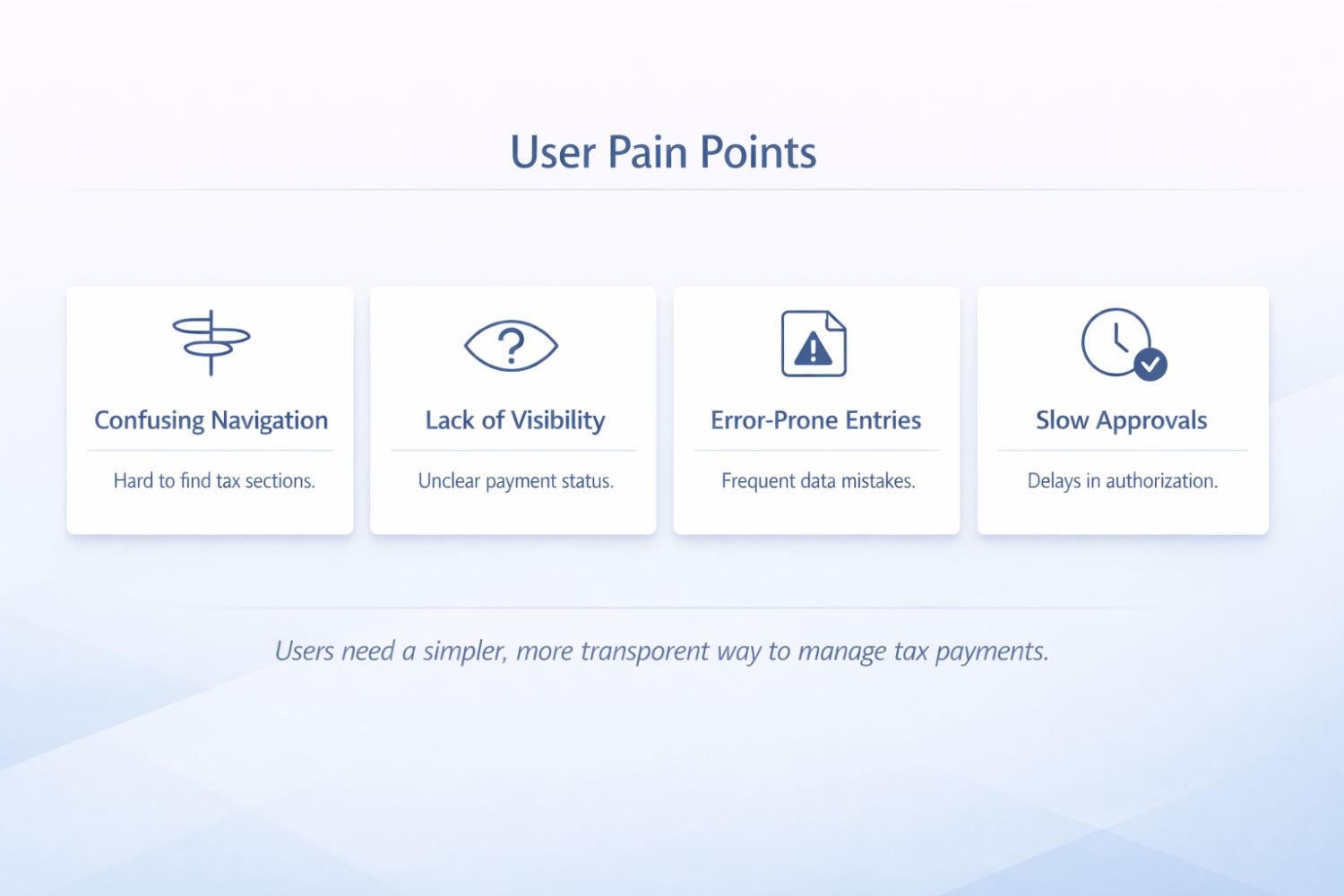
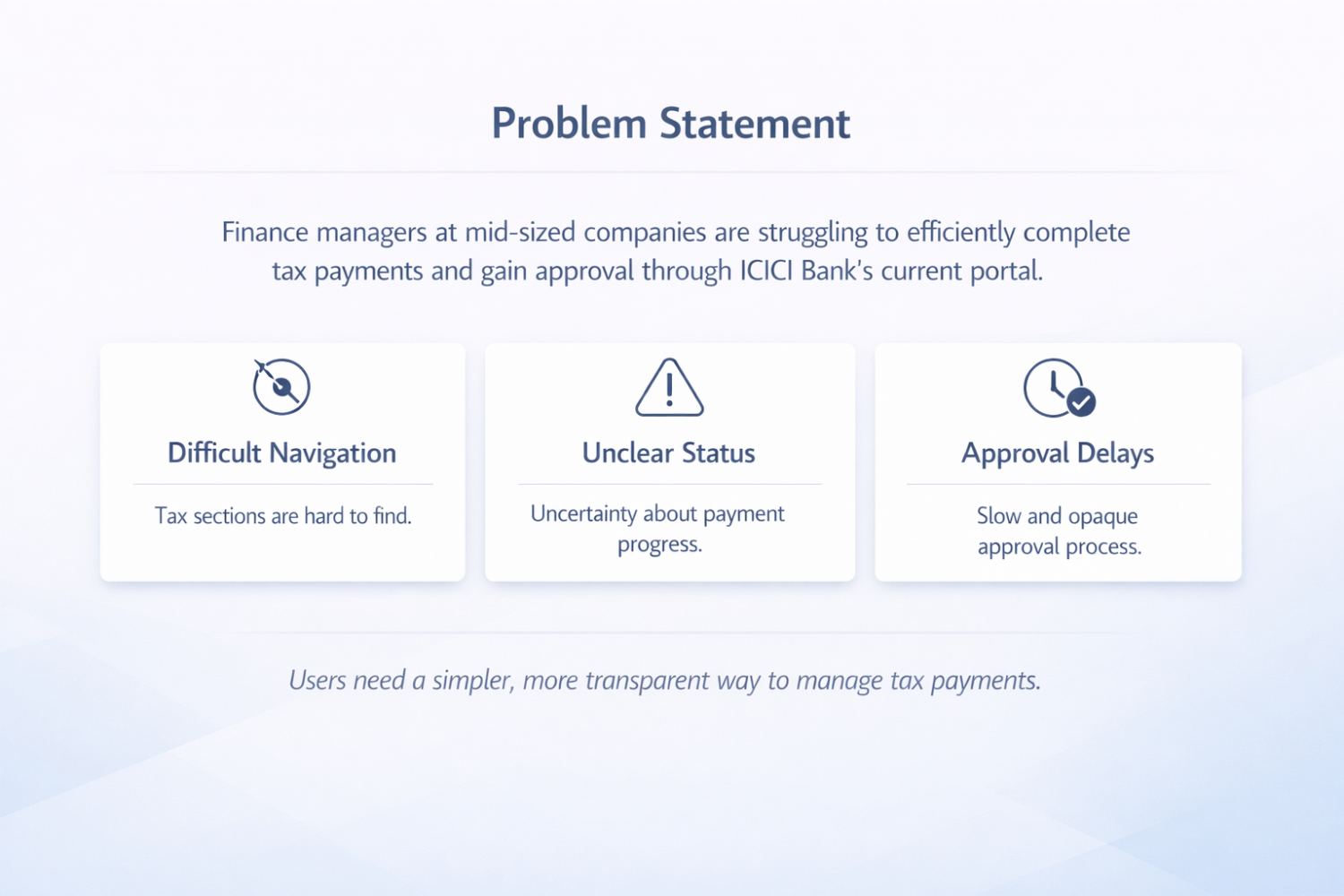
Enhancing the tax payment experience with a clean and minimalist UI. Finance managers were struggling to complete tax payments and get them approved: tax sections were hard to find, payment progress was uncertain, and approvals were slow and opaque.

Stage 01  /  Problem

Statutory deadlines, and no reliable read on where a payment stood

Finance managers at mid-sized companies pay direct and indirect tax through their corporate banking portal, in cycles, against fixed statutory deadlines. In the existing portal the tax sections sat inside a generic payments menu, there was no dependable way to tell whether a payment had been submitted, scheduled, or was waiting on an approver, and approvals were chased by phone and email.

The cost of that uncertainty is asymmetric. A missed deadline means interest and penalties for the customer, and for the bank it means support load, escalations, and a real churn risk on exactly the high-value corporate relationships tax payments make sticky.

Stage 02  /  Research

Two users, not one

Stakeholder interviewsUser interviewsHeuristic auditSupport tickets & analytics

I interviewed finance managers who initiate payments and the approvers who release them, alongside stakeholder interviews with the bank’s product and operations teams. I audited the existing portal heuristically against the tax workflow end to end, and reviewed support tickets and portal analytics to find where people stopped.

The initiator and the approver turned out to want almost opposite things from the same screen. Initiators need to assemble and submit a batch; approvers need to judge and release one, fast, often on a phone between meetings. The original portal served neither, because it treated both as the same “user”.

Stage 03  /  Insights

What the research changed

I1

The question on arrival is “what needs me today”

Nobody logs in wanting a payment form. They want to know what is pending, what is scheduled, and what is stuck waiting on someone else. The dashboard had to answer that before any table loaded.

I2

Status must be stated, not inferred

Users were reconstructing status from dates and amounts. Every row needed an explicit status in the words they already used, not the words the backend used.

I3

Bulk is the norm, single is the exception

A cycle means dozens of challans. Designing the single payment first and bulk as a variant had the priority backwards.

Stage 04  /  Flow

From triage to receipt

The flow was rebuilt around triage first and a shared form shell second, so the switch between single and bulk changes the inputs and nothing else. The approval queue was separated from the payments table entirely, because it belongs to a different person doing a different job.

Step 1

Dashboard

Four counters answer what is pending, scheduled, awaiting approval and approved.

→

Step 2

Initiate

Single or bulk share one form shell; bulk accepts a challan set at once.

→

Step 3

Preview

A summary of totals and counts before anything is submitted.

→

Step 4

Approve

A dedicated queue with batch release, separate from the payments table.

→

Step 5

Receipt

Challan and confirmation retrievable from the transaction record.

Stage 05  /  Decisions

Structuring the dashboard

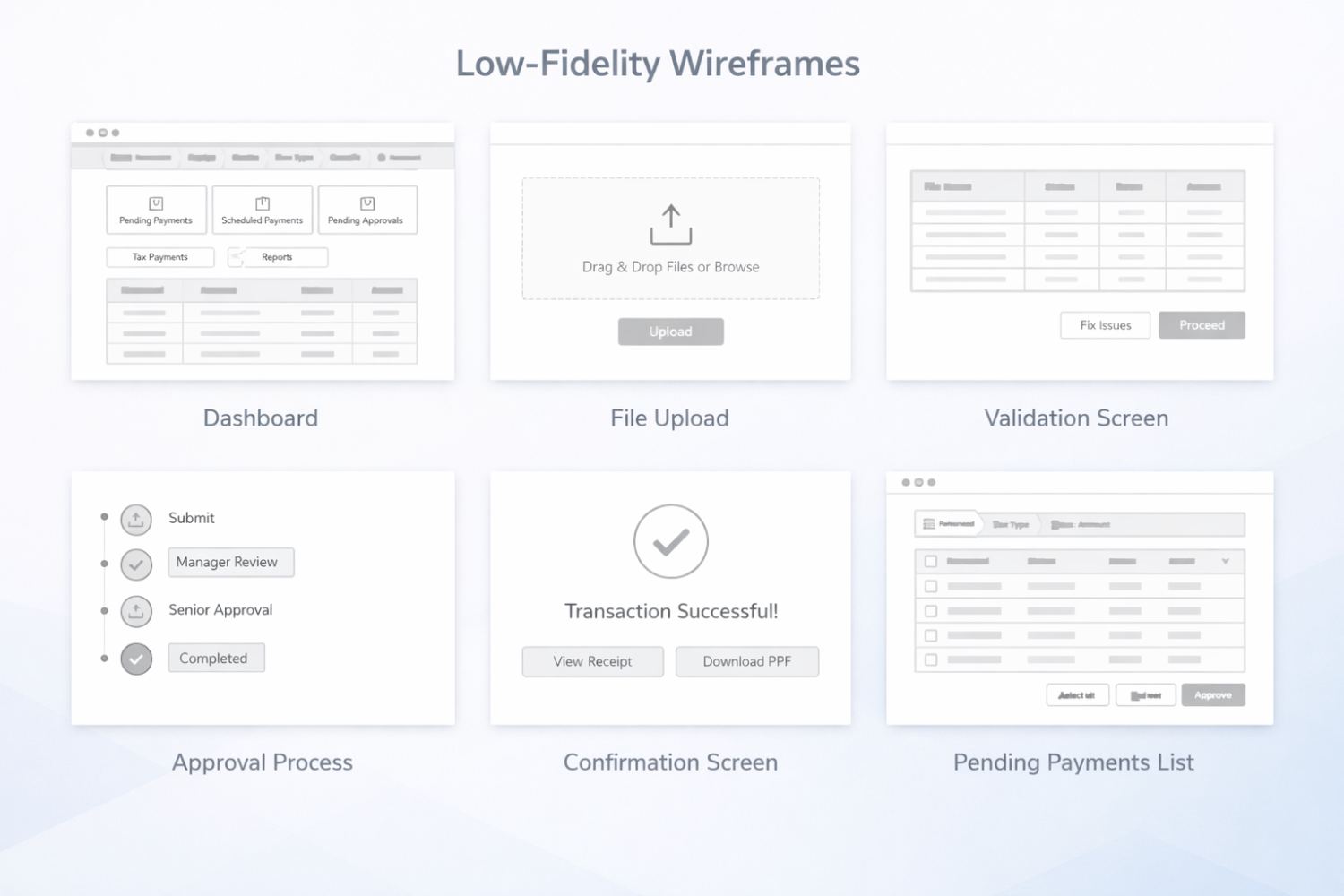
Three wireframes settled the dashboard: what the landing state leads with, how a row carries its own status, and how single and bulk payment share one form.

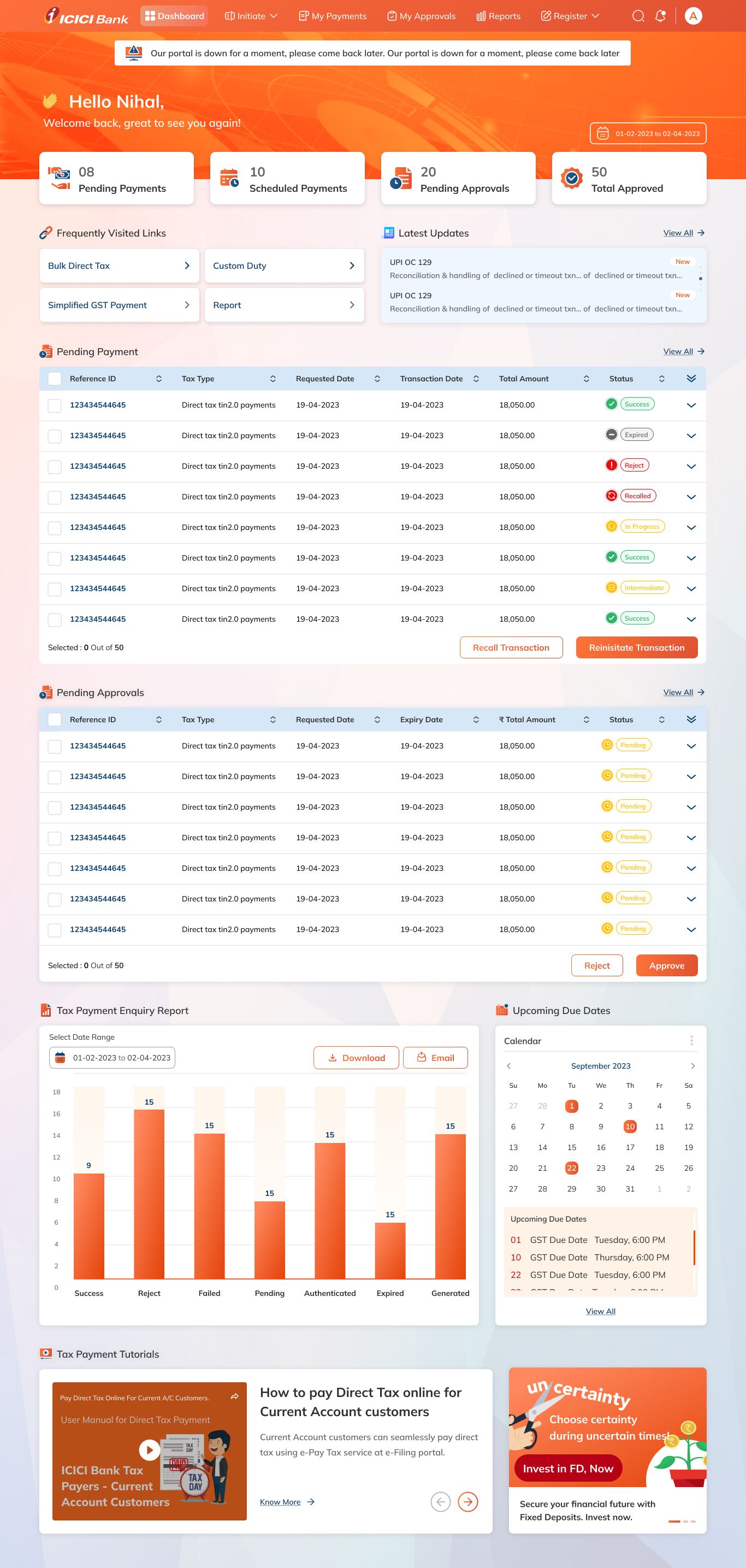
Status first: four counters — pending payments, scheduled, pending approvals, total approved — answer “where does my money stand” before any table loads.
Every row carries an explicit status chip, and bulk actions sit pinned at the foot of the table so approving many payments is one gesture, not many.
Single and bulk payment share one form shell, so the switch between them changes the inputs and nothing else.

Before

Tax sections were buried in a general payments menu, and the landing screen opened on a transaction table.

After

The dashboard leads with four counters — pending, scheduled, awaiting approval, approved — so triage happens before any table loads.

Before

Payment state had to be inferred from dates and amounts spread across columns.

After

Every row carries an explicit status chip in the vocabulary users already use for it.

Stage 06  /  Final UI

The shipped portal

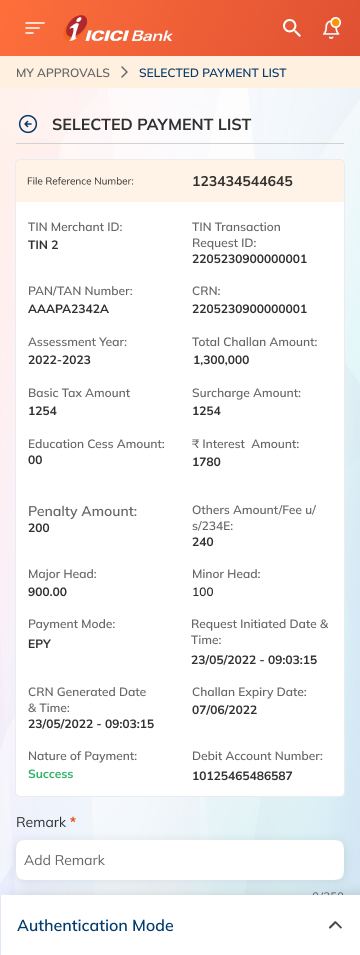
ICICI Bank tax portal dashboard

Problem

Difficult navigation, unclear payment status, and approval delays across the existing portal.

What I did

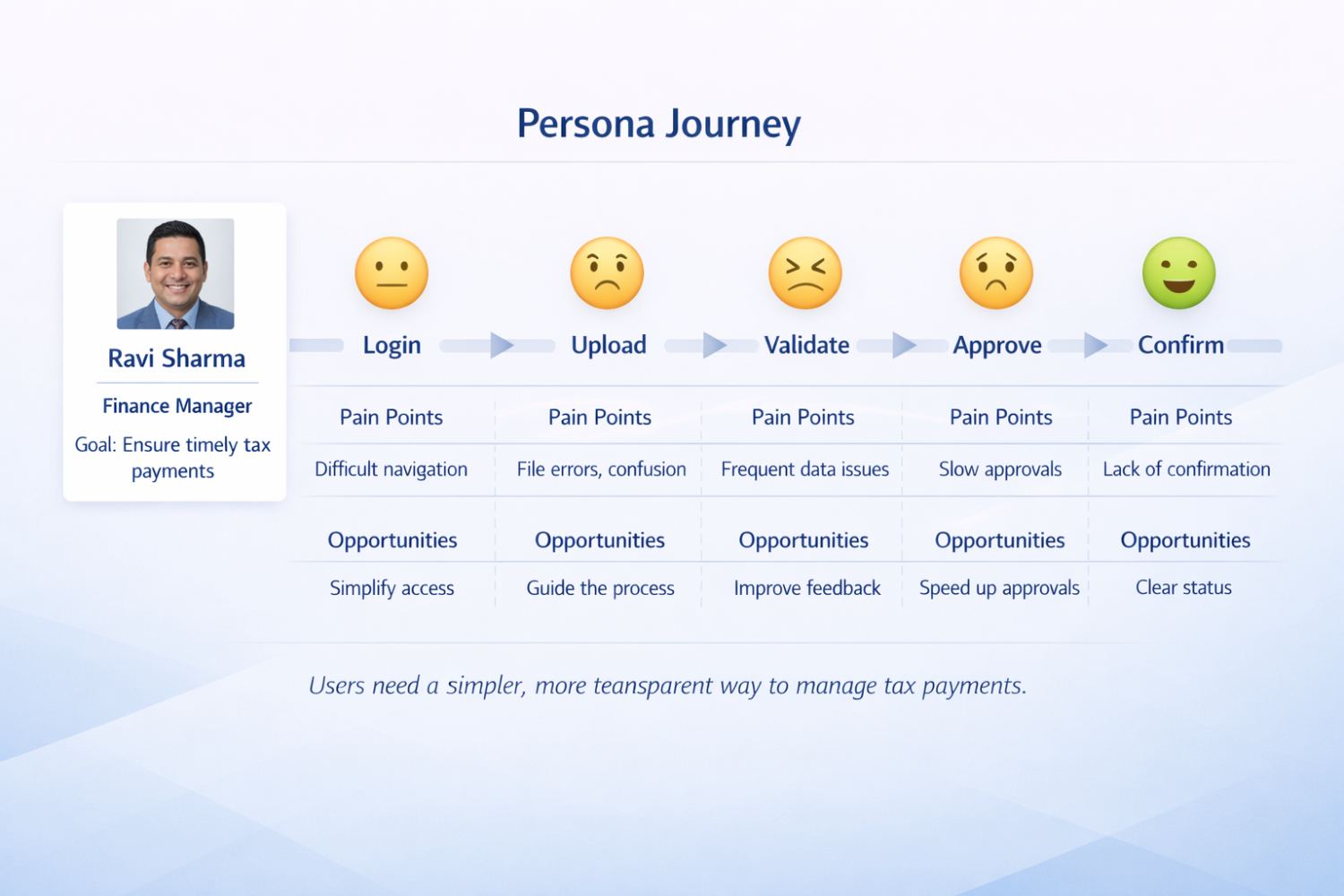
Mapped the finance manager journey from login to confirmation, then restructured the dashboard around pending payments, approvals and due dates.

Result

Designing clarity for confidence — transforming complexity into simplicity.

Problem statement
Persona journey
Case study slide
Case study slide
Case study slide
Project conclusion
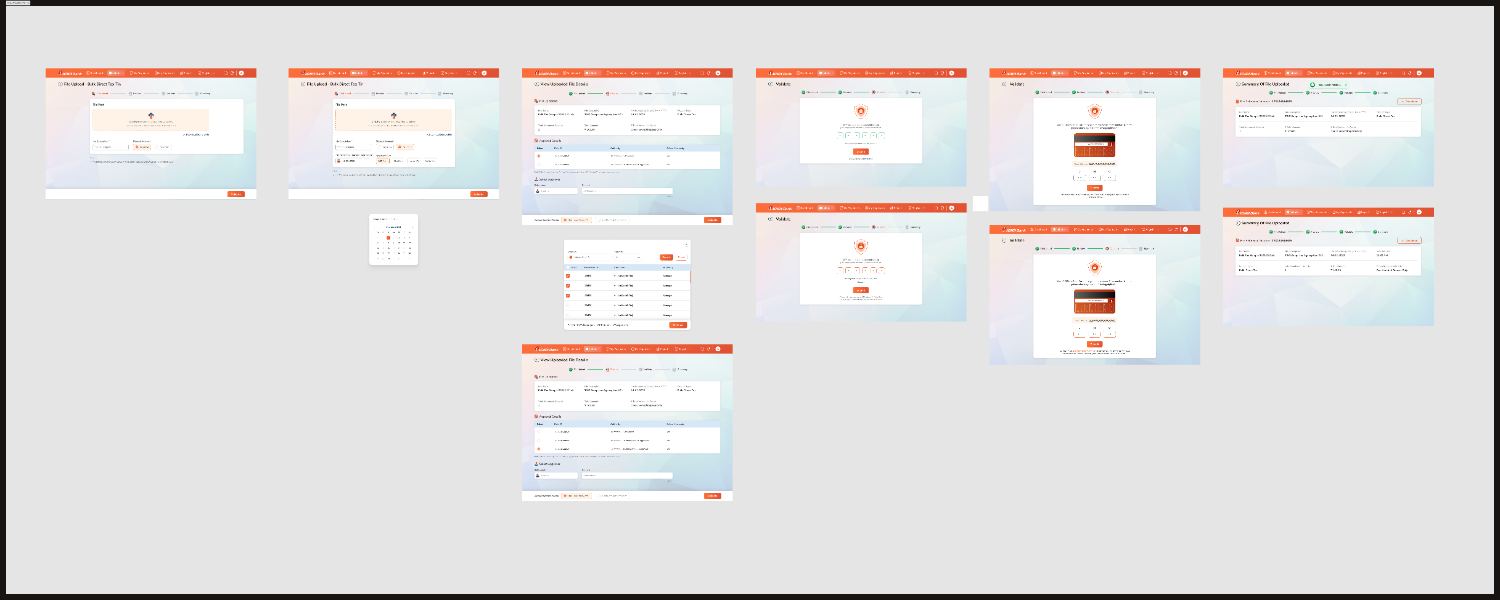
Initiate bulk direct tax flow

Initiate flow — bulk direct tax  /  scroll to pan

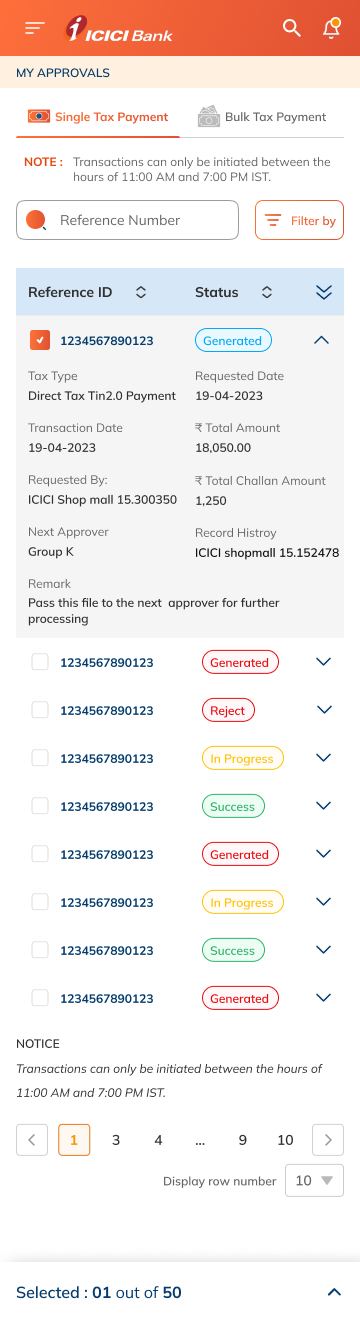
Approvals screen
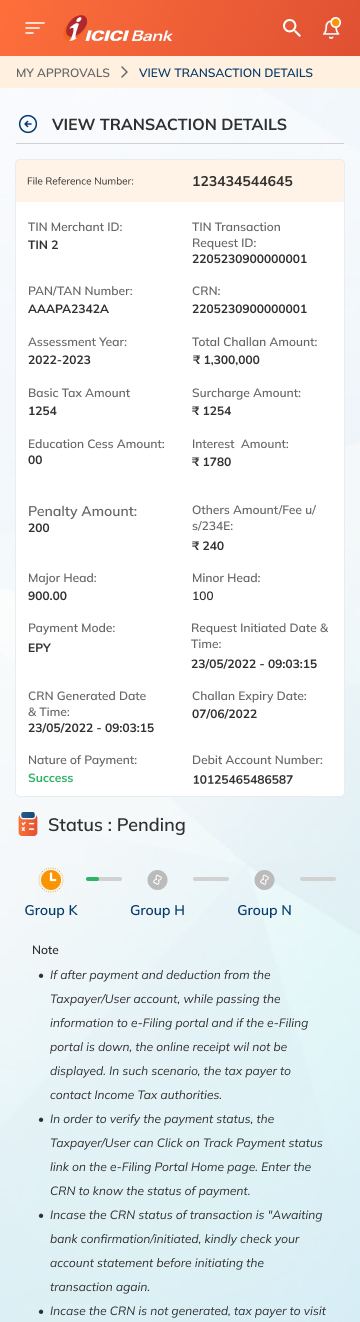
Transaction detail page
Preview and confirm

Stage 07  /  Validation

Tested with initiators and approvers separately

I ran moderated usability tests on the prototype with finance managers and, in separate sessions, with approvers. The tasks were the cycle in miniature: pay a single challan, submit a batch, release a batch as approver, and retrieve last month’s receipt.

C1

Status vocabulary was rewritten

The labels taken from the system did not match what users called those states out loud. The chips now use their words, which removed most of the hesitation before approving.

C2

The confirm step gained a totals summary

Batch submitters would not commit without seeing count and total value together. Preview now states both before submission.

C3

Approvals moved out of the payments table

Approvers kept losing their queue inside a table built for initiators. Splitting it made batch release a single deliberate action.

Stage 08  /  Reflection

What I would do differently

Delegation is unsolved. If the named approver is on leave during a filing week, the flow has no honest answer, and I learned that late because I recruited approvers who were at their desks.

I would also push for deadline awareness in the product itself. The portal shows what is pending but not what is urgent, and the deadline is the one fact every user in this workflow already carries in their head.

Design bookmarks

{{ resourceCount }}

The sites I keep coming back to, split by what they cost. “Paid” tools often have a free plan — it’s noted on the card. Pricing changes, so check before you commit.

Nothing matches that.

Picked from evernote.design and nosignups.net — both worth a browse for the full lists.

← All work
03

Undetach — Figma plugin

Beta

Role

Concept, design, build

For

Design system maintainers

Does

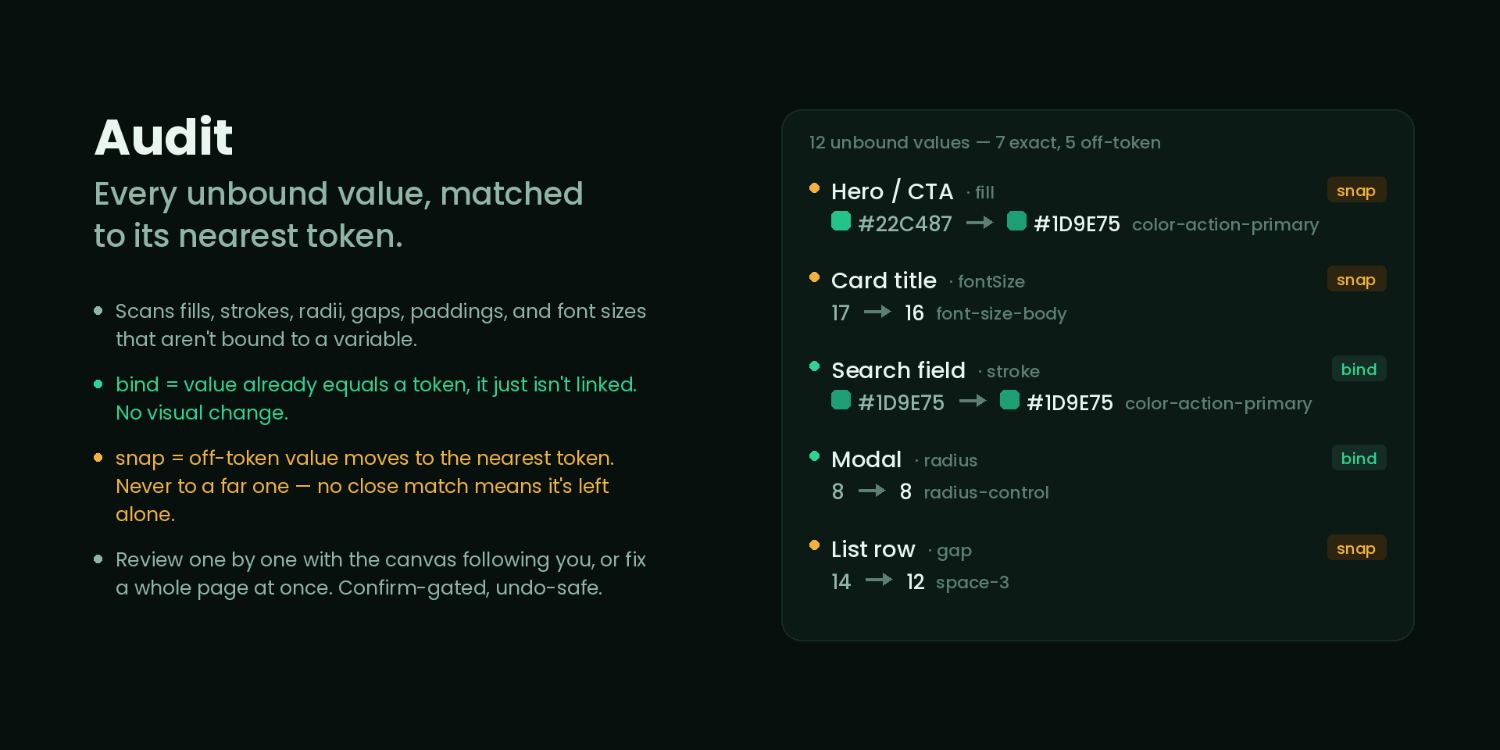
Token drift, component stats, value audit

Privacy

No network, no AI, confirm-gated writes

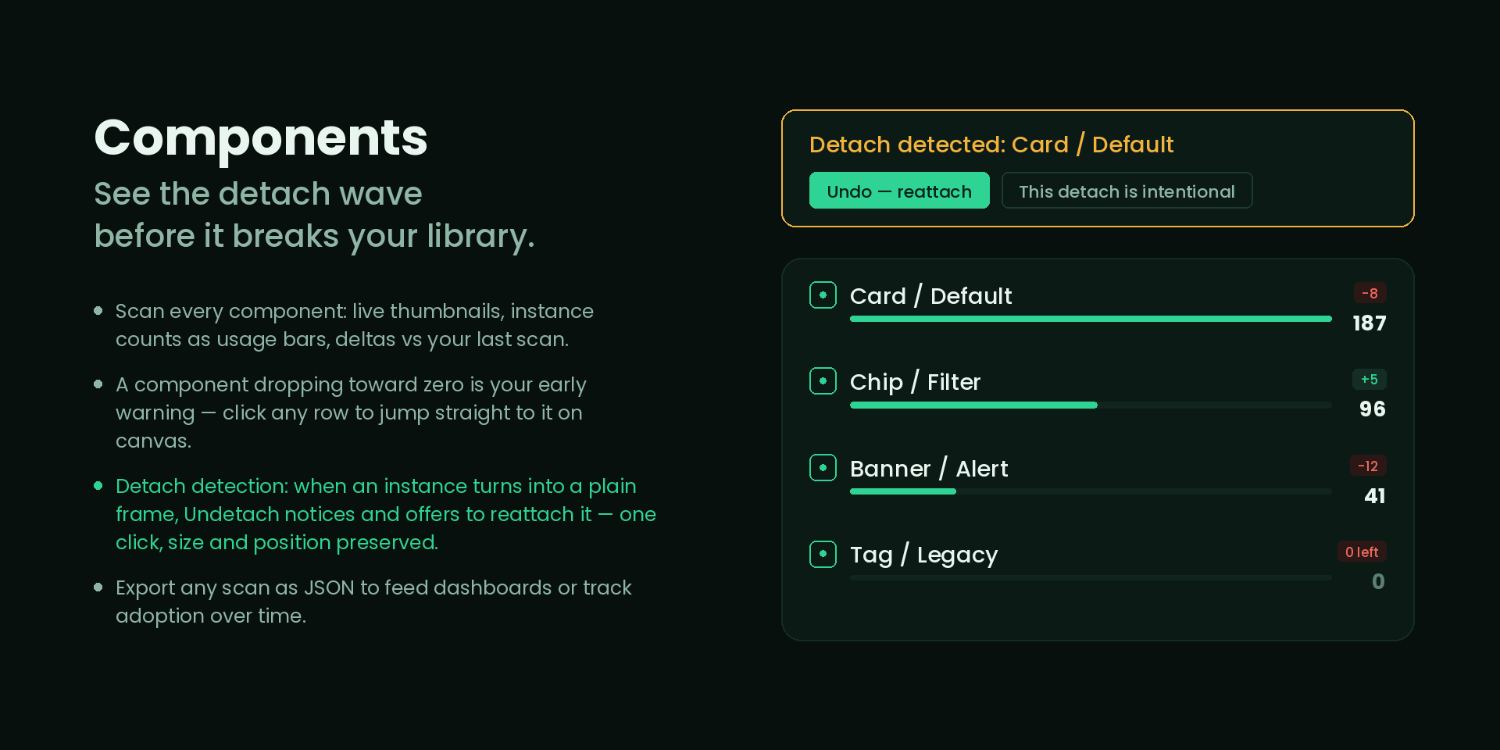
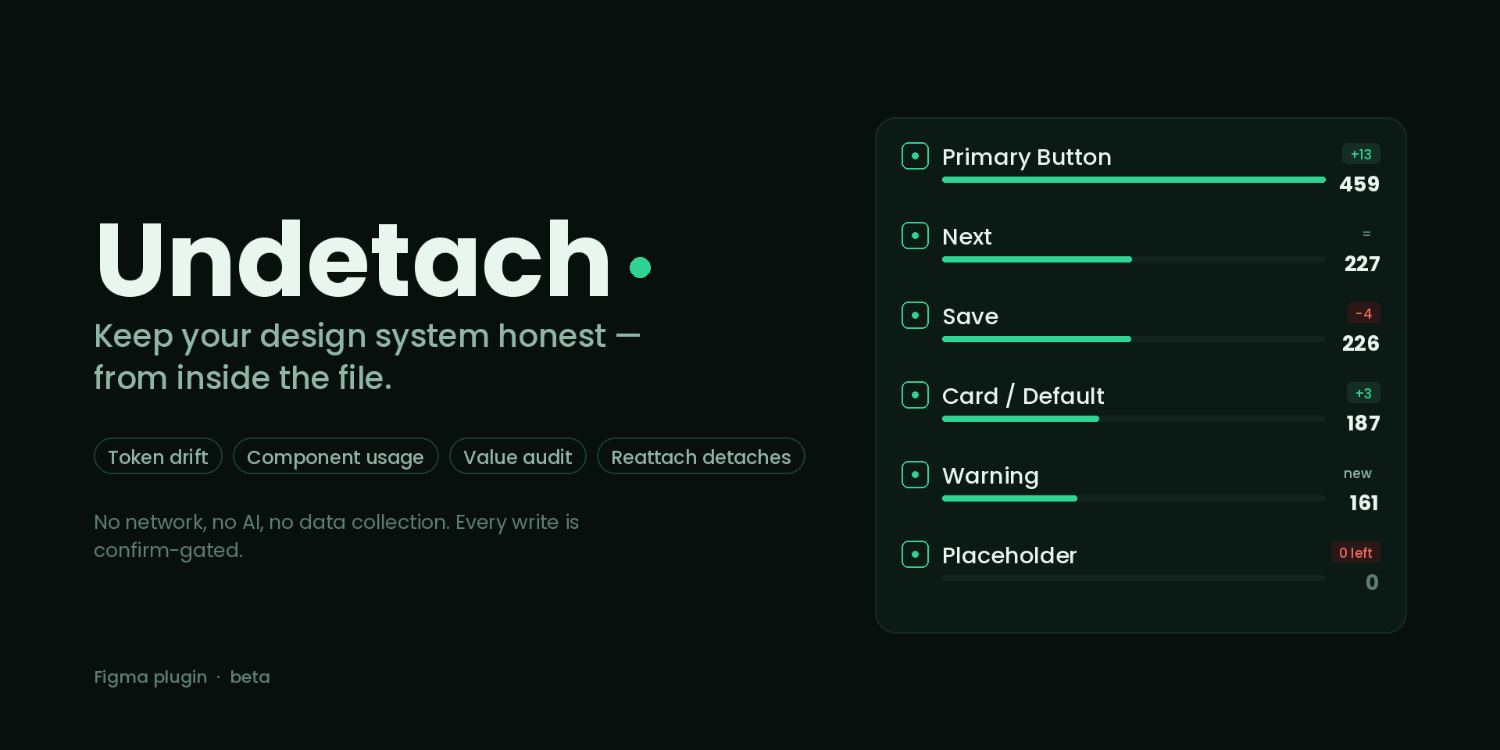
Keep your design system honest — from inside the file. Undetach scans every component for live thumbnails, instance counts and deltas since your last scan, and flags detaches the moment an instance turns into a plain frame.

Get it on Figma Community ↗ Free for personal use · Beta

Stage 01  /  Problem

A design system cannot report on itself

Detaching an instance takes one keystroke and leaves no trace. Over a few months a library quietly stops describing the product: components are duplicated, tokens are overridden with raw values, and instances become plain frames that no longer inherit anything.

The cost lands on engineering, as rework on components that were supposed to be settled, and on the maintainer, who can only find drift by opening files and looking. Existing plugins could count what was in a file but could not tell you what had changed since last week.

Stage 02  /  Research

Asking maintainers what they actually check

Interviews with system maintainersCompetitive plugin auditHeuristic review

I interviewed designers who maintain systems for product teams and audited the plugins they already had installed. The pattern was consistent: they did not want a report, they wanted an early warning, and they would not run anything that could write to a production library without asking first.

Stage 03  /  Insights

What the research changed

I1

Deltas matter more than totals

“142 instances” means nothing on its own. “Eleven fewer than your last scan” is the sentence that makes someone investigate.

I2

A detach is an event with a time

Drift is only actionable if the tool can say when it started, so every scan is stored as a baseline to compare against.

I3

Writes must be confirm-gated, or nobody runs it

Maintainers refused to grant write access to a library on trust. No network, no AI, and no silent changes became stated product constraints rather than implementation details.

Stage 04  /  Flow

Scan, compare, confirm

Step 1

Scan

Walk the file and record every component, instance count and override.

→

Step 2

Compare

Diff against the last scan and surface deltas per component.

→

Step 3

Flag

Show instances that became plain frames, and values that bypass tokens.

→

Step 4

Fix

Every write is previewed and confirmed one change at a time.

Stage 05  /  Decisions

Thumbnails over names

Maintainers recognise their components visually long before they recognise the naming convention, so the scan view leads with a live thumbnail per component and treats the name as secondary. Counts sit next to the thumbnail with the delta attached, which makes a scan readable at a glance instead of row by row.

Stage 06  /  Final UI

The plugin

Undetach plugin cover
Component scan view
Value audit view

Stage 07  /  Validation

In beta with maintainers

The plugin is in beta with design system maintainers running it against live libraries. The first round of feedback moved the delta from a detail inside the component row to the thing the row leads with, and added the confirm step on every write rather than one confirmation per session.

Stage 08  /  Reflection

What is next

Scan history is local to the person who ran it, which is wrong for a system owned by a team. The honest next version keeps shared history and reports drift on a schedule, so the warning arrives without anyone remembering to look.

Next case study Albanero Datamesh →

How I work

A design-thinking approach to problem framing, rapid prototyping, and cross-functional collaboration.

01 / Frame

Understand the real problem

Interviews, workflow shadowing and journey mapping before a single screen. In enterprise the brief is rarely the problem.

02 / Structure

Simplify the flow

Information architecture and state models first: what the user needs to see, decide and confirm at each step.

03 / Build

Systems, not screens

Components, tokens and patterns that hold up across hundreds of screens — and tooling to keep them honest.

04 / Validate

Test, ship, revise

Usability testing with real operators, then close iteration with engineering through release.

About

Most of my work sits in data products and banking — data platforms, pipelines and governance tools, and the regulated flows behind financial services. These are domains where the interface has to carry real weight: dense tables, audit trails, permissions, and users who know their job far better than I do.

Alongside that I have shipped health, wellness and consumer work, and I have worked both inside a design team and as the only designer in the room — consultant through Head of Design, across web apps, mobile, and brand.

“Versatile UI/UX designer with a passion for solving design challenges. Let’s create exceptional user experiences together!”

My motto

UX Research Usability Testing Data Products Banking & Fintech Web Applications Design Systems Information Architecture Prototyping Stakeholder Collaboration

Tools

Figma, Adobe XD, Sketch, Adobe Illustrator

Certifications

Certified User Experience Specialist (CUXS) — Google
Certificate of Excellence — Gymnasium

Experience

{{ tlHint }}

{{ tlYears }} {{ tlKind }}

{{ tlRole }}

{{ tlOrg }}

{{ point }}

{{ tlLinkText }}
For other designers Design bookmarks I keep coming back to {{ resourceTotal }} tools and references, split into free and paid. Browse bookmarks →

Let me know how I can improve

Rate the site, tell me what fell short, and it goes straight to my inbox.

Rate me

{{ feedbackMsg }}

Email it to me instead →